Bosch Fire Panel Monitoring Software
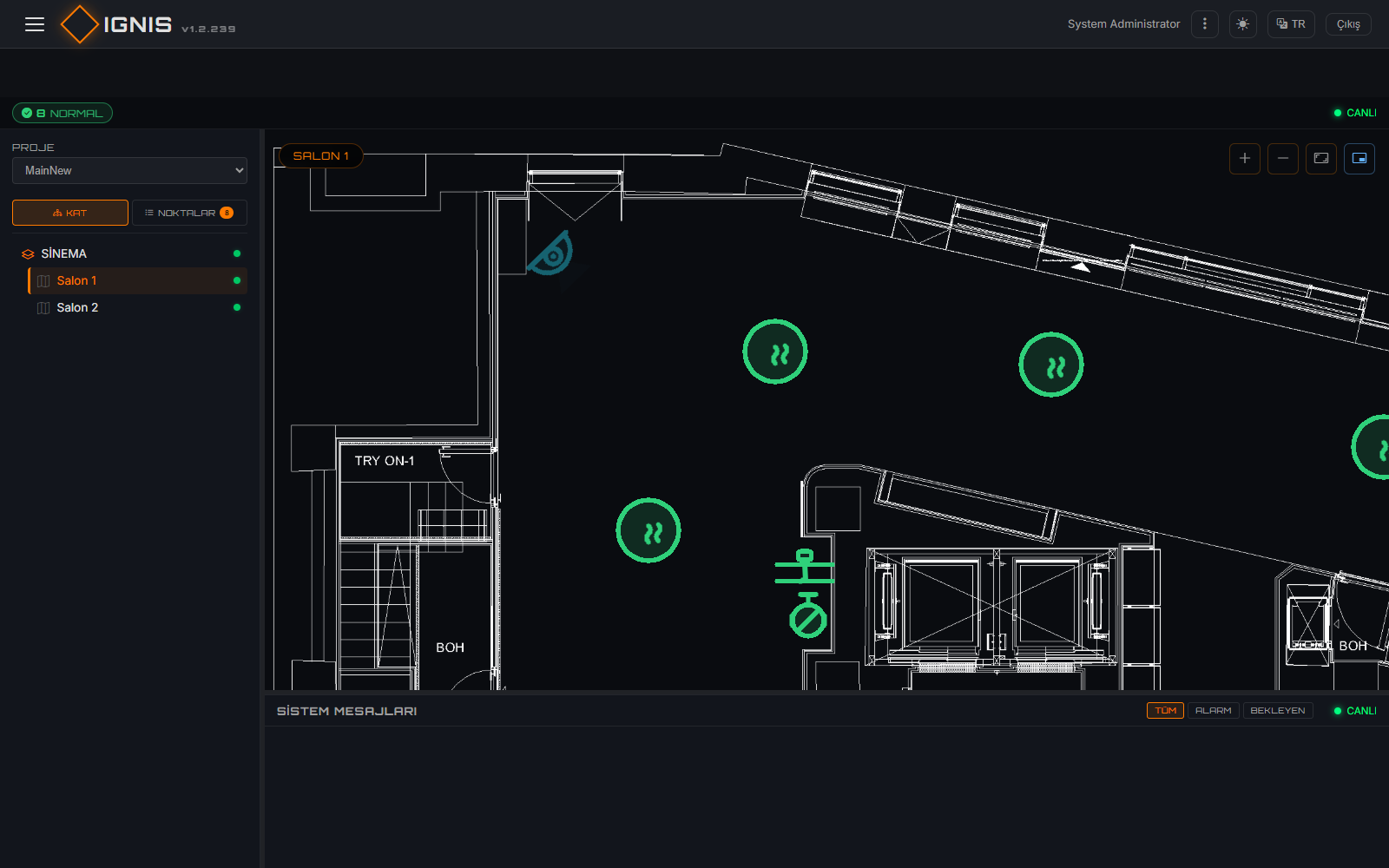
IGNIS VIEW shows every alarm, fault and status change from Bosch modular fire alarm panels on the floor plan, at the detector's real position, the moment it happens. It connects through Bosch's official OPC server, FSM-5000-OPC: the operator sees the alarm on the map and sends acknowledge and reset to the panel from the same screen.
How does it connect to a Bosch panel?
IGNIS VIEW does not talk to the panel directly. Bosch's own OPC server talks to the panel network, and IGNIS connects to that server as a standard OPC DA client. The panel configuration stays in Bosch's tools (FSP-5000-RPS); IGNIS never touches the panel program.
What you need on the Bosch side
- FSM-5000-OPC server — its version must match the panel software release (per Bosch's compatibility table).
- An OPC license on the panel (for example the premium license on AVENAR panel 8000).
- A panel network configured with FSP-5000-RPS, reachable from the OPC server over Ethernet.
What you need on the IGNIS side
- Windows Server 2019 / 2022 or Windows 10 / 11 — a local server on site; no internet required.
- .NET 10, bundled in the installer (no separate framework installation).
- Database: PostgreSQL 14+ (installed with IGNIS), Microsoft SQL Server 2019+ or file-based JSON.
What you see on screen
- Live status on the floor plan: every point in the Bosch OPC tree (detector, call point, module) is shown at its real position. Alarm, fault, bypass, isolation and walk test / maintenance states are reflected in its icon and color instantly.
- State → color → priority mapping: how each Bosch state code is colored and prioritized is set to match the site's rules. On a high-priority alarm the map zooms to the right floor and point by itself.
- Hover and right-click: hovering a point shows its name and status; the right-click menu offers the commands that apply to that point.
- Message list and acknowledgement: incoming alarms are listed by level; when an operator acknowledges, who acknowledged, when, and the response time are recorded.
Commands you can send to the panel
Commands are passed to the panel through FSM-5000-OPC's command channel. Which command appears for which point type (detector, sounder, output module…) is defined in the Command Groups screen.
| Command | What it does |
|---|---|
ACK | Acknowledges the alarm / message |
RESET | Resets the panel / element |
WALKTEST_ON · WALKTEST_OFF | Starts / stops walk test |
ISOLATE_ON · ISOLATE_OFF | Isolates the element / removes isolation |
BYPASS_ON · BYPASS_OFF | Turns bypass on / off |
ACTIVATE_ON · ACTIVATE_OFF | Activates / deactivates an output |
Floor plans
Use the site's existing drawings: DWG files are converted to DXF automatically and rendered in the browser with WebGL; PDF and image (PNG/JPG) plans can be uploaded too. Points are placed with the Map Editor. All DXF floors are loaded into memory at startup, so switching between floors is instant.
Beyond Bosch monitoring
- Cameras: IP / ONVIF cameras in the same interface; the relevant cameras can open automatically on an alarm.
- Event rules: define actions such as messages or showing cameras for specific conditions, centrally.
- Reports: alarm history, point states and system health as tables and charts.
- Access control: role-based page permissions and an audit log.
Frequently asked questions
Does IGNIS VIEW connect to the Bosch panel directly?
Which Bosch fire panels are supported?
Can IGNIS VIEW send commands to the Bosch panel?
Does it need an internet connection?
Is it free?
Try the demo first
The real IGNIS interface in your browser with sample data: live monitoring on floor plans, the camera screen and reports.
Open the live demo Register and download